Lab Safety Orientation
Completion of this orientation is a prerequisite for receiving keys or card access to the MItHRIL Lab (Walter Light Hall, Room 704). It applies to all new members: graduate and undergraduate students, postdoctoral fellows, visiting researchers, volunteers, and casual or summer staff.
The orientation satisfies the lab-specific portion of the Queen's New Employee/Student Safety Orientation Checklist (revised May 31, 2022). The signed checklist is kept on file by the Principal Investigator, and the Departmental Safety Officer is informed once it is complete. The checklist must be completed within the first two weeks of arrival; in this lab it must be completed before keys are issued.
How the orientation works
Steps 1 to 5 are online and can be finished before your first day. Each gives you a certificate or completion record to upload on the form.
- 1. Health and Safety Awareness. Complete Queen's training.
- 2. WHMIS 2015. Complete Queen's training.
- 3. TCPS 2: CORE. Complete the Course on Research Ethics tutorial, required because we work with human participants.
- 4. Emergency booklet. Read Your Guide to Responding to Emergencies (Queen's Campus Security and Emergency Services). Attested on the form.
- 5. Ladder safety training. Watch the video and complete the quiz. Mandatory for everyone in this lab. Completion is recorded on the form.
- 6. Read this page in full.
- 7. Attestation form. Complete the Safety Orientation Attestation Form (Microsoft Form): upload your three certificates (Health and Safety Awareness, WHMIS 2015, TCPS 2: CORE), confirm your ladder safety training, and attest that you have read the emergency booklet and this page, and know where things are. Your response and uploaded certificates are kept as the record.
- 8. Visit the lab at least once with your supervisor, and confirm you know where the exits, assembly point, and safety equipment are. Your supervisor signs the Queen's checklist.
- 9. Hardware sign-offs. The equipment owner signs you off on any equipment you will operate. These may be completed after keys are issued.
- 10. Keys issued by the Lab Director once steps 1 to 8 are complete, and logged in the key log.
Keys are not issued until steps 1 to 8 are complete. Hardware sign-offs (step 9) are required before you operate a given system, and may be completed after keys are issued.
The sections below follow the order of the Queen's checklist, so this page and the checklist can be read side by side. The online trainings, the emergency booklet, and the ladder training come first because they can be finished before you arrive.
Part 1: Online training (complete first)
Certificates must be provided to the Lab Director and kept on file.
1. Health and Safety Awareness
Required for everyone: queensu.ca/risk/safety/training/health-safety-awareness
2. WHMIS 2015
Required for anyone who works with, or in close proximity to, chemicals. In this lab that includes the resin printing workflow, isopropyl alcohol, adhesives, solvents, and soldering consumables. An annual refresher is also required: queensu.ca/risk/safety/chemical
The Queen's checklist lists WHMIS later, under General and Chemical Laboratory Safety; it is completed up front here so that your first visit to the lab can focus on the lab itself.
3. TCPS 2: CORE (research ethics)
Required for everyone, because the lab conducts research with human participants. Complete the Panel on Research Ethics tutorial TCPS 2: CORE (Course on Research Ethics) at tcps2core.ca. It is self-paced, takes about four hours, and ends with a knowledge check; you receive a certificate of completion when you score at least 80%. Upload the certificate on the Safety Orientation Attestation Form.
4. Your Guide to Responding to Emergencies
Everyone must read the Queen's booklet Your Guide to Responding to Emergencies: queensu.ca/risk/security/emergency-response-procedures. It covers fire, medical, and security emergencies, and what to do in each. You will attest on the Safety Orientation Attestation Form that you have read it.
5. Ladder safety training
Ladder safety training is mandatory for every member of this lab, whether or not you expect to use a ladder, because step stools and ladders are used for ceiling and shelf work. Complete Queen's Ladder Safety training: queensu.ca/risk/safety/training/ladder-safety. Watch the Ladder Safety video (sign in with your Queen's account), then complete the ladder safety quiz on the training page. Queen's Environmental Health and Safety (safety@queensu.ca) can answer questions about registration. Record the date you completed it on the Safety Orientation Attestation Form.
Other training
- First Aid and CPR are encouraged for senior members but not required for key access.
- Radiation Safety, Biohazard, and Transportation of Dangerous Goods training are not applicable to this lab. The corresponding sections of the Queen's checklist are marked N/A.
Part 2: General safety
In an emergency
Dial 911 first, then call the Campus Security Emergency Report Centre:
- Police, fire, ambulance: 911
- Emergency Report Centre: 613-533-6111
The full contact list is under Responding to emergencies below.
University policies
You are expected to be familiar with the Health and Safety Management System, the Policy Statement on Health and Safety, and the Policy Statement on Environmental Health and Safety: queensu.ca/risk/resource-index
Emergency evacuation
On hearing the alarm, stop work, put robots into a safe state if this takes seconds and does not place you at risk (press the emergency stop; do not shut down software), and evacuate. Do not return until Security or Fire Services declares the building safe. Learn the evacuation routes below before your first visit to the lab, and walk them with your supervisor on that visit.
The space
The lab is Room 704 in Walter Light Hall (Building 171) on the seventh floor. The room is approximately 81 m². It opens onto the central corridor that runs along the south side of rooms 704 to 710, with neighbouring labs and offices on either side.
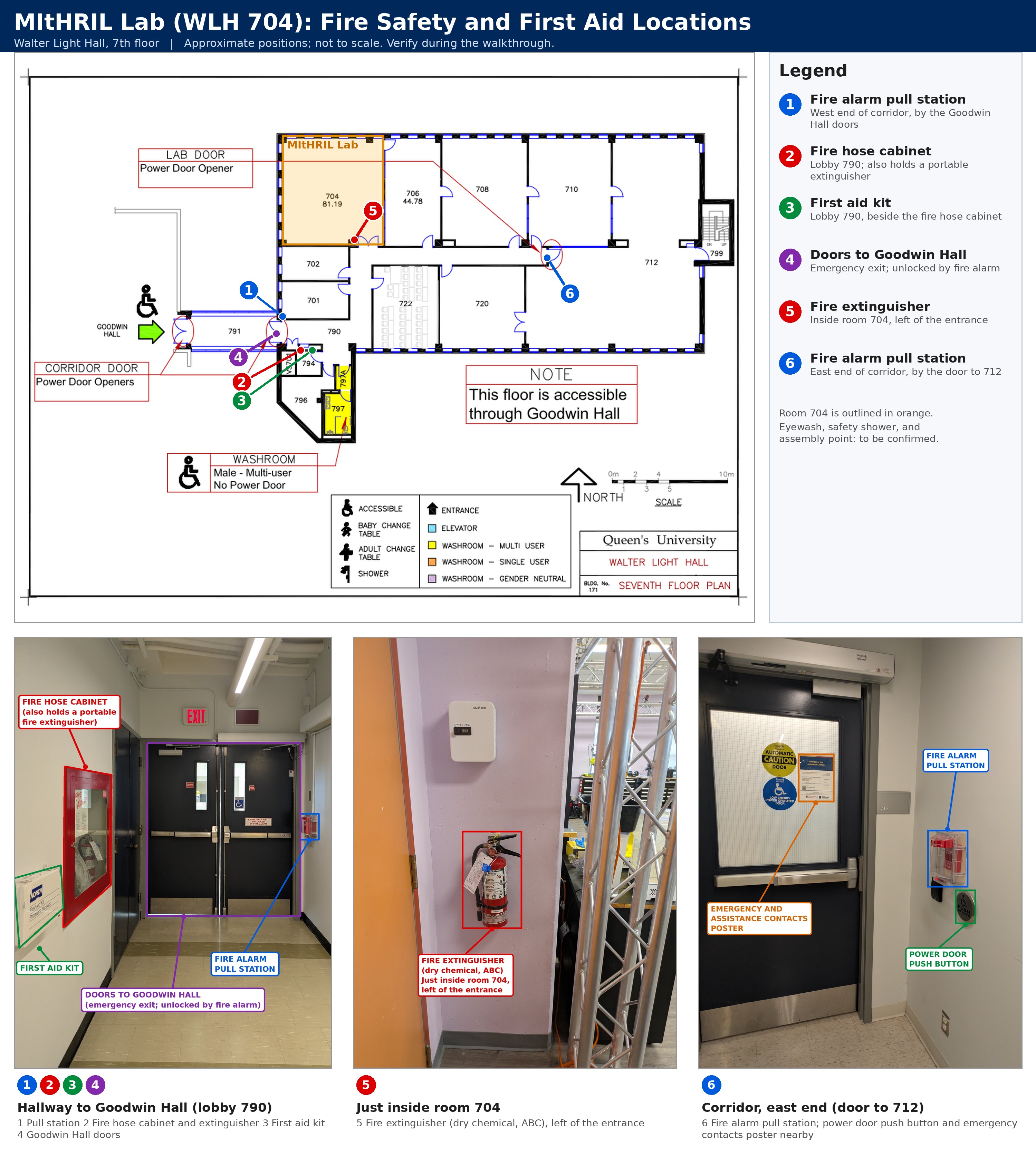
Figure: Seventh floor plan of Walter Light Hall with numbered locations of the pull stations, fire extinguishers, fire hose cabinet, first aid kit, and Goodwin Hall doors, and the matching photos. Positions are approximate and not to scale. Base plan: Queen's University Facilities.
Evacuation routes
Two routes lead from Room 704 to a stairwell. Learn both; use whichever is clear and away from the hazard.
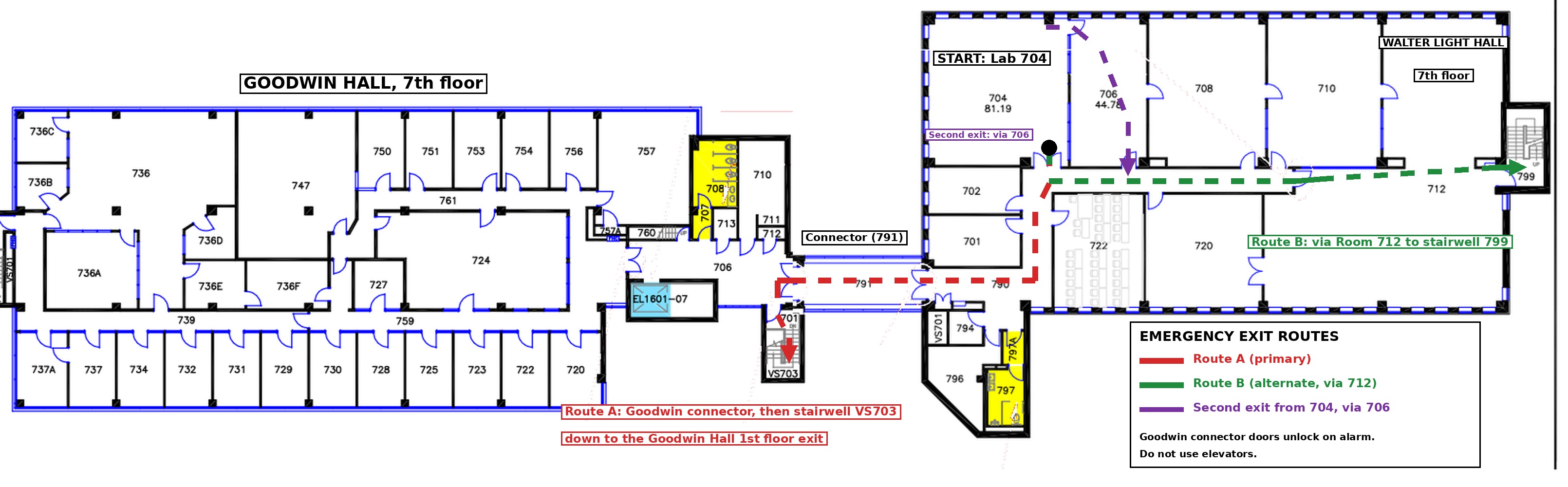
Figure: Seventh floor plans of Walter Light Hall and Goodwin Hall joined at the Goodwin connector (corridor 791). Route A (red) is the primary route; Route B (green) is the alternate; the second exit from 704 (purple) passes through Room 706. Positions are approximate and not to scale. Base plans: Queen's University Facilities.
Goodwin Hall connector. Leave 704 through its main door, follow the passage to lobby 790, and go through the Goodwin Hall doors along connector 791. The doors are held shut during normal operation and unlock when the fire alarm sounds. On entering Goodwin Hall, take stairwell VS703 immediately south of the connector and descend to ground level and exit the building.
Stairwell 799 via Room 712. Leave 704, turn east along the corridor, pass through Room 712 to stairwell 799 at the east end of the floor, and descend to ground level and exit the building.
If the main door of 704 is blocked, leave through the door in the northeast corner of 704 into Room 706 and out through 706's door to the corridor, then continue to either route.
Do not use the elevators during an alarm
Use the stairwells only.
Assembly point
After leaving the building by either route, cross Union Street and gather in the green space south of Goodwin Hall and Walter Light Hall, east of the Miller Museum of Geology (the triangle between Union Street and Arch Street, circled below). Stay there until Security or Fire Services gives the all clear, and tell your supervisor or the person in charge that you are out.
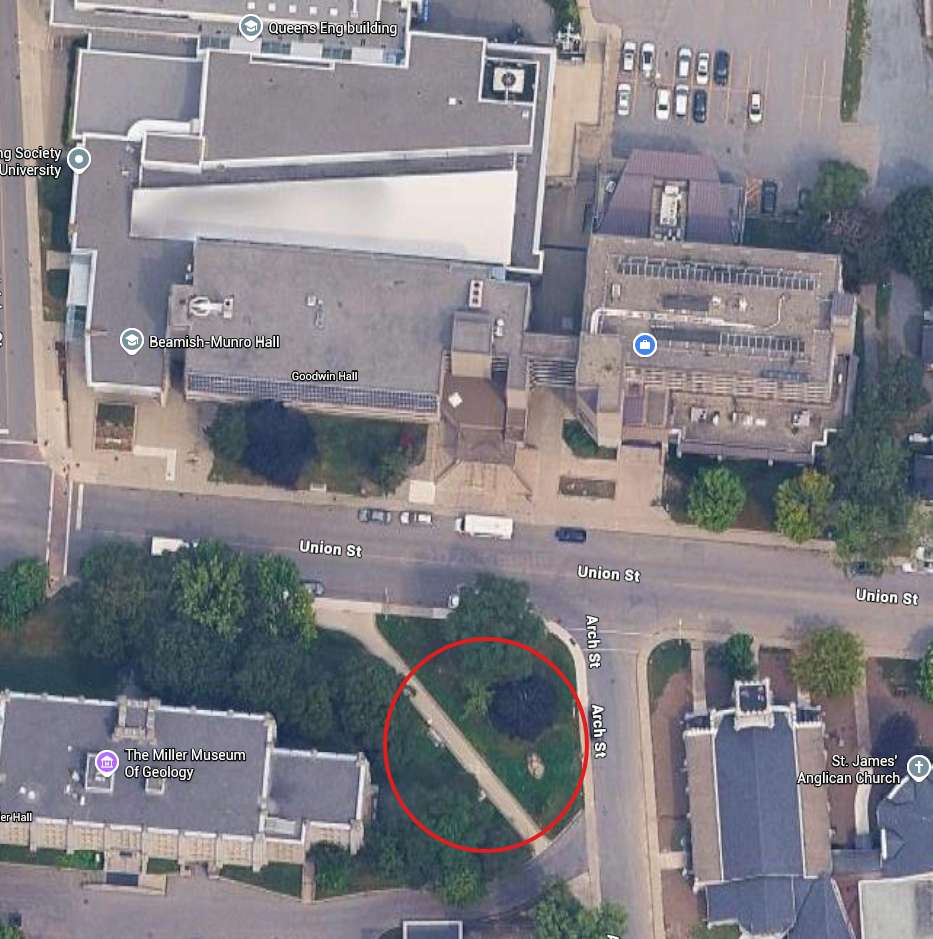
Figure: Assembly point (red circle). Base map: Google Maps.
Key locations
Where to find things
The locations below come from the annotated floor plan and site photos (numbers refer to the figure above). Positions are approximate; confirm each one in person on your first visit to the lab with your supervisor.
| Item | Location |
|---|---|
| Exits from room 704 | Main lab door onto the passage to lobby 790. Second exit: the door in the northeast corner of 704 into Room 706, then out through 706's own door to the corridor |
| Primary evacuation route (Route A) | Lobby 790, through the Goodwin Hall connector 791, down stairwell VS703 to ground level and out of the building |
| Alternate evacuation route (Route B) | East along the corridor, through Room 712 to stairwell 799, down to ground level and out of the building |
| Fire alarm pull stations | Two on this wing: (1) west end, in lobby 790 on the wall beside the double doors to Goodwin Hall; (6) east end of the corridor, beside the door to room 712 and its power door push button |
| Fire extinguisher inside the lab (dry chemical, ABC) | (5) Inside room 704, mounted on the pillar directly beside the entrance door, on your left as you enter |
| Fire hose cabinet (also holds a portable extinguisher) | (2) Lobby 790, on the left wall as you face the Goodwin Hall doors |
| First aid kit | (3) Lobby 790, on the same wall, beside the fire hose cabinet |
| Bucket of sand (for small battery fires) | Inside room 704, in the northeast corner |
| Doors to Goodwin Hall | (4) Double doors at the west end of lobby 790; an emergency exit that is unlocked by the fire alarm |
| Trained first aiders (names) | None currently. If you are trained in first aid and would like to be a registered lab first aider, indicate this on the Safety Orientation Attestation Form |
| Eyewash station | None on the seventh floor. Use the sink in room 797 (Walter Light Hall) or the Goodwin Hall 7th floor washroom. Anyone may use either for eye washing in an emergency |
| Safety shower | None on the seventh floor |
| Emergency stops (lab-level) | None. There is no lab-level emergency stop; each robot has its own emergency stop (see Part 4) |
| Nearest washrooms | Room 797, Walter Light Hall (male washroom, one toilet, one urinal, one sink; no power door). Goodwin Hall 7th floor washroom (female), through the connector |
| ECE Departmental Safety Bulletin Board | Adjacent to WLH Room 101 (up-to-date safety information; there is none in the lab) |
| Assembly point after evacuation | Green space across Union Street, south of Goodwin Hall and Walter Light Hall and east of the Miller Museum of Geology (see figure below) |
Fire alarm pull stations
- Activate the nearest fire alarm pull station first. The alarm always comes before any attempt to fight a fire. The pull stations are at the west end of lobby 790 (beside the Goodwin Hall doors) and at the east end of the corridor (beside the door to 712).
- Leave by the nearest safe exit; close doors behind you if it is safe to do so. The double doors to Goodwin Hall are an emergency exit and unlock when the fire alarm sounds.
- Do not use elevators.
- Assist anyone who needs help only if it is safe; otherwise tell emergency responders where they are.
- Go to the assembly point and report to the Lab Director or designate for a head count.
Portable fire extinguishers
Portable extinguishers are for small fires only, and only by people who have been trained to use them. The alarm is activated first. The extinguisher inside the lab is a dry chemical (ABC) unit mounted beside the entrance door; a second is in the fire hose cabinet in lobby 790. Do not use the fire hose cabinet unless you have been trained; leave it to Fire Services. If in doubt, leave.
Lithium-ion battery fires (robot packs, laptops, VR headsets, power tools) can reignite and release toxic smoke. The lab keeps a bucket of sand for small battery fires: first, pour sand over the burning battery, or place the battery in the bucket of sand, only if you can do so safely without leaning into the smoke. Otherwise, or if the fire is not immediately contained, spreads, or produces heavy smoke, pull the alarm, evacuate, and call 911. See the battery procedure in Part 4.
Responding to emergencies
Save these numbers in your phone. They are also posted on the Emergency and Assistance Contacts poster beside the door to 712.
| Who | When | Phone |
|---|---|---|
| 911 | Life-threatening emergency: police, fire and rescue, ambulance. Call first. | 911 |
| Emergency Report Centre (Campus Security) | After calling 911; also safety concerns, persons in distress, emergency assistance | 613-533-6111 |
| Campus Security, non-emergency | Lone Worker checks, safe walk between buildings, security concerns, unauthorized entries | 613-533-6080 |
| Campus Security, general inquiries | General questions | 613-533-6733 |
| AMS Walkhome Service | A walk home | 613-533-9255 |
| ECE Departmental Safety Officer, Peter Rowsome | SDS questions, unsafe conditions, incident reports | 613-541-8070, pjr4@queensu.ca |
- Notify the Lab Director as soon as it is safe to do so.
Read the booklet Your Guide to Responding to Emergencies (step 4 above): queensu.ca/risk/security/emergency-response-procedures.
Individual workplace emergency response plans
If you have a disability or a temporary mobility restriction, you may need an individual workplace emergency response plan so that you can leave the building safely during an alarm. Please bring this up with the Lab Director, by email or in conversation, and also indicate it on the Safety Orientation Attestation Form. Information is available through Queen's Human Resources. This is confidential, and arrangements will be made before keys are issued.
The seventh floor is accessible through Goodwin Hall, via the connecting corridor (room 791). Power door openers are installed on both doors of the corridor and on the lab-wing door; the push buttons are mounted on the wall beside each door (for example, beside the door to room 712). The male washroom (797) is on this floor and does not have a power door.
Reporting unsafe conditions
Unsafe conditions or acts must be reported to the Lab Director or the Departmental Safety Officer. Where it is feasible and safe to do so, you are expected to correct minor hazards yourself (for example, removing a tripping hazard such as a cable across a walkway or a chair left in a robot's path). Near misses are reported as well; they are how this lab learns without anyone being hurt. Reports will never be held against you. Report through the lab's Safety Incident Report Form (Microsoft Form), by message on Slack, or in person.
Incidents and near misses
Report every injury, incident, and near miss to the Lab Director immediately. Use the lab's Safety Incident Report Form (Microsoft Form) or message the Lab Director on Slack, and an incident report form must also be completed and forwarded to EH&S. Provide first aid within your training and call 911 for anything serious.
Workplace Safety and Insurance Board (WSIB)
Anyone doing work in the lab, including research assistants and casual hires, is covered under WSIB. Work-related injuries must be reported to your supervisor or the Departmental Safety Officer immediately, through the Safety Incident Report Form or on Slack; prompt reporting protects your claim.
Warning signs and labels
Learn the meaning of every warning sign and label in the lab; Part 4 and the signs posted in the lab cover these. If you do not recognize a symbol, ask before proceeding.
Personal protective equipment (PPE)
Wear the PPE specified for each task (see Part 4). PPE is cared for, stored properly, and replaced when damaged. Part 4 lists when each item is required.
Safety Committee and Safety Bulletin Board
The Departmental Joint Health and Safety Committee addresses safety concerns in the department. The ECE Departmental Safety Bulletin Board is adjacent to WLH Room 101 and carries up-to-date safety information, including the Committee's membership and minutes; the lab itself has no bulletin board. The lab does not currently have any registered first aiders; if you are trained in first aid and would like to be a registered first aider, please say so on the Safety Orientation Attestation Form. The lab's first aid kit is in lobby 790 (see the figure above).
Working in hot environments
Follow Queen's policy on working in hot environments. The Departmental Safety Officer emails the department when heat is a concern. If the lab is too hot, do not work in it. Lab policy: when the indoor temperature reaches 30°C, leave the lab and work somewhere cooler. In any heat, take breaks and stay hydrated, particularly near running printers or enclosed equipment.
Footwear
Closed-toe shoes are required whenever you work on robots or equipment, including the fabrication area. They are not required when you are working at your desk. Sandals, open-toed shoes and bare feet are not permitted near the robots or equipment.
Food and drink
Food and drink are permitted at the desks only. They are not permitted at electronics, tool or 3D printing workbenches, or in the 3D printing area, because resins, solvents and electronics are used there. Clean up after yourself every time, and dispose of any food waste outside the lab so that it does not attract vermin. See also Lab Etiquette and Cleanliness.
Ladders and step stools
Ladder safety training is mandatory (see step 5). Use only approved, intact Queen's step stools or ladders, and never stand on chairs or tables. Do not work at height alone. Personal ladders and step stools are not permitted on campus.
Working alone and after hours
Hazardous work (see Part 4) must not be performed alone. Specifically:
- Operating the KUKA LBR iiwa, the Ridgeback mobile manipulator, the Unitree G1, or any robot capable of unexpected motion requires a second person present in the room who knows where the emergency stop is.
- Resin printing, soldering, and the use of power tools require a second person present.
-
Hazardous work outside normal working hours requires the Lab Director's approval. If a second person is not present, notify Campus Security. Whenever you are alone in the lab, at any time, you must use the Queen's SeQure app (free for Android on Google Play and for iPhone on the Apple App Store; use its WorkAlone feature), which is Campus Security's Lone Worker program. This is lab policy, especially for evenings and weekends. Install and test the app before your first solo session.
Campus Security (Lone Worker checks):
613-533-6080
In an emergency while working alone:
911, then the Emergency Report Centre 613-533-6111 - Low-risk work (writing, analysis, simulation, desk-based software development) may be done alone but should still follow the lone worker practice of letting someone know you are in the building.
Lab security
The lab holds expensive robots, computers and participant data, and members sometimes work in it alone, so security is part of safety.
Doors. Keep the lab door closed at all times and locked whenever the lab is unoccupied, even for a short absence. Never prop a door open. Do not let in anyone you do not know (do not hold the door for them); ask them to contact the Lab Director.
Keys. Keys are issued to you personally. Do not share, lend or duplicate them. If a key is lost or stolen, report it to the Lab Director immediately, because the lock or access may need to be changed. Return your key when you leave the lab or when your role ends. The Lab Director keeps the key log.
Visitors. Visitors may enter the lab only with the Lab Director's prior permission, which you must request before each visit. You are responsible for the conduct and safety of any visitor you bring, and you must accompany them at all times.
Equipment. Do not remove lab equipment from the lab without recording it in the equipment tracking system.
Suspicious people or theft. Report anything suspicious, and any theft or damage, to Campus Security (613-533-6080) and tell the Lab Director. In an emergency, call 911, then the Emergency Report Centre (613-533-6111).
Working alone. See Working alone and after hours above; the SeQure WorkAlone feature is required whenever you are alone in the lab.
Physical requirements
Some tasks involve lifting (robot bases, batteries, equipment cases) or working in awkward positions. Use a cart or get help for loads you cannot handle comfortably, and tell the Lab Director if you have any restriction that affects your work.
Part 3: Chemical laboratory safety
Safety shower and eyewash
There is no eyewash station or safety shower on the seventh floor, and none in Room 704. In an emergency involving the eyes, use the sink in a seventh floor washroom: room 797 in Walter Light Hall or the washroom in Goodwin Hall (through the connector). Room 797 is designated for male students and the Goodwin washroom for female students, but anyone may use either one for eye washing in an emergency. Locate both washrooms on your first visit to the lab with your supervisor. If you need help reaching a washroom, ask a colleague to assist and call the Emergency Report Centre. For serious injury, dial 911. Seek medical attention after any eye exposure.
- Emergency Report Centre: 613-533-6111
- Serious injury: 911
The lab does not normally handle corrosive chemicals. The chemicals in use are resin for 3D printing, isopropyl alcohol, and a small number of other solvents. These are stored in the chemical safety cabinet in Room 712. Wear the eye protection whenever you handle resin, isopropyl alcohol, or any other solvent. It hangs on the lighting truss beside the Elegoo Saturn S resin 3D printer in Room 704.
Lab coats and gloves
Lab coats and gloves are worn in the halls only when transporting hazardous material. When you transport hazardous material (for example, resin or isopropyl alcohol), use a sealed container inside a secondary container and the one glove method: wear a glove on one hand to hold the container, and keep the other hand bare to open doors and press buttons so that shared surfaces are not contaminated.
WHMIS
Completed in Part 1. Anyone working with or near chemicals must complete Queen's WHMIS 2015 training and the annual refresher. Record the completion date on the checklist.
Handling reagents, spills, disposal, and storage
The lab does not run a chemical program. The only chemicals present are consumables associated with fabrication: resin, isopropyl alcohol, adhesives, solder, and cleaning agents. They are stored in the chemical safety cabinet in Room 712, and must be stored properly, segregated from incompatible materials, labelled, and used according to their Safety Data Sheet (SDS). Report spills to the Lab Director; for anything beyond a minor spill, evacuate and call Campus Security. Chemical spill, storage, and disposal procedures are provided by Queen's EH&S. Never pour resin, solvents, or contaminated wipes down the drain or into the regular trash.
ChemWatch and ChemFFX (Safety Data Sheets)
Queen's University offers real-time electronic SDS reference through ChemFFX. ChemFFX is a database developed and maintained by ChemWatch®, with search tools and extensive details on thousands of chemicals. The data is commonly presented as ChemWatch-written (Gold) Safety Data Sheets, vendor (supplier) written SDSs, or both. The ChemWatch-written SDSs are often preferable because they are more detailed, are available in multiple languages, and follow a consistent format that is easy to read.
ChemFFX can be used on desktop computers and on mobile devices. After hours, if a computer or the internet is unavailable, you can obtain an SDS by contacting Queen's Campus Security at 613-533-6733 (non-emergency line).
Training and access are linked from queensu.ca/risk/safety/chemical. Resources:
- Training presentation and video tutorial
- ChemWatch SDS Reference Sheet
- ChemWatch WHMIS Workplace Label Reference Sheet
If an SDS is missing or out of date, contact the ECE Departmental Safety Officer, Peter Rowsome:
- Phone: 613-541-8070
- Email: pjr4@queensu.ca
You can also contact Queen's EH&S.
Radiation and biological safety
Not applicable. No radioisotopes, sealed sources, or biohazardous materials may be brought into room 704. Anyone planning human-participant studies involving bodily fluids or tissue must speak with the Lab Director first.
Part 4: Lab-specific hazards (department-specific orientation)
This section outlines the hazards in room 704 by system. It is an overview; each system has its own page in the Technology Guides, and equipment-specific training is covered by the hardware sign-offs.
Robots with unexpected motion (all platforms)
- Treat every robot as though it will move at any time, including when "idle" or after a software fault.
- Know where the emergency stop is before you power anything on, and keep it within reach.
- Never place yourself between a robot and a fixed surface (wall, table, bench).
- Keep your hands, hair, lanyards, loose clothing, and jewellery clear of joints and end-effectors.
- Do not run new or untested code on hardware without a second person present and the workspace cleared. Test in simulation first.
- Never override, tape, or bypass an interlock, enclosure, or safety function.
KUKA LBR iiwa R800 (and the Ridgeback + KUKA mobile manipulator)
The KUKA is a collaborative arm, but it is not inherently safe: payload, tool geometry, and speed can all produce injurious forces. Follow the protected-space procedure on the KUKA LBR iiwa R800 page. Safety-activation credentials are not posted on the wiki; ask the Lab Director. The mobile manipulator combines a heavy mobile base with an arm; its stopping distance is long, so keep clear of its path of travel and never ride on it.
Unitree G1 humanoid and AgileX Piper
Humanoids can fall, and falls are the primary hazard (pinch points, crush, and impact). Use a gantry or support harness where specified, keep a clear radius around the robot, and never operate it near stairs or the corridor. Review the Unitree G1 and AgileX Piper pages before first use.
Batteries
Lithium-ion and lithium-polymer batteries power most of the lab's mobile systems. Charge only in the designated area with approved chargers, never unattended overnight, and never charge or use a swollen, punctured, or damaged battery. Report damaged batteries to the Lab Director; do not discard them in regular waste.
If a battery smokes, hisses, swells, or catches fire:
- Keep your face and body back from the smoke, which is toxic. Do not touch the battery with bare hands.
- If it is safe to do so, pour sand from the lab's sand bucket over the battery, or place the battery in the bucket of sand (the bucket is in the northeast corner of 704).
- If the fire is not immediately contained, spreads, or fills the room with smoke, pull the nearest fire alarm, evacuate, and call 911, then notify the Emergency Report Centre:
- 911
- Emergency Report Centre: 613-533-6111
- Leave a battery that has been in a fire covered in sand, away from anything combustible, because it can reignite. Do not use it again, and report it to the Lab Director.
Sand covers and isolates a burning battery but may not stop it from overheating internally, which is why the alarm and evacuation come first if you have any doubt.
3D printing and fabrication
- Filament printers (Bambu Lab H2C). Hot ends and beds reach temperatures that cause burns; do not reach into a printing or cooling machine. Keep the enclosure closed during printing and ensure adequate ventilation. Never leave a print running overnight without the Lab Director's approval.
- Resin printer (Elegoo Saturn S). Uncured resin is a skin and respiratory sensitizer. Wear nitrile gloves, eye protection, and a lab coat or apron; work in the designated ventilated area; and collect all resin waste, washing solvent, and contaminated wipes for hazardous waste disposal. Complete WHMIS before using the resin printer. Cured parts are safe to handle, but uncured surfaces are not.
- Hand tools, soldering, and power tools. Use eye protection, tie back hair, and keep a clear workspace. Soldering requires ventilation or a fume extractor. Training on any tool is provided before first use; do not use tools you have not been shown how to use.
Virtual and augmented reality
- Clear the play area of people, furniture, and cables before putting on a headset; use a spotter for anyone new to VR.
- Remove the headset if you experience nausea, dizziness, or disorientation, and report any lasting symptoms.
- Be aware that the headset obscures trip hazards; never walk while wearing one without a defined, cleared play area.
- Disinfect shared headsets between users.
Electrical
Inspect cords and power supplies before use, never daisy-chain power bars, and do not work on live circuits. Report damaged equipment immediately and tag it out of service.
Housekeeping, computers, and ergonomics
Keep aisles, exits, and the area around each robot clear; return tools and equipment to their place. Cable management is a safety issue in this lab, not merely a tidy one (see Lab Etiquette and Cleanliness). Set up your workstation to suit you, take regular breaks, and report persistent discomfort early; it is far easier to address before it becomes an injury.
Policies and resources
- Health and Safety Management System, Policy Statement on Health and Safety, and Policy Statement on Environmental Health and Safety: you are expected to be familiar with these.
- Queen's Environmental Health and Safety
- Lab Etiquette and Cleanliness
- Computer Use Policy
- Work Hours and Leave
- Exit Procedures and Documentation
Safety Orientation Attestation Form
After completing the online trainings (Health and Safety Awareness, WHMIS 2015, and TCPS 2: CORE), reading the emergency booklet, completing the ladder safety training, and reading this page, complete the Safety Orientation Attestation Form below (sign in with your Queen's account). You will upload your Health and Safety Awareness, WHMIS 2015, and TCPS 2: CORE certificates, confirm your ladder safety training, and check off that you have read the emergency booklet and this page, know where the safety equipment and exits are, and understand the lab's safety protocols. Your response is recorded automatically and used to prepare your Queen's checklist. You must also visit the lab at least once with your supervisor and confirm that you know where the exits, the assembly point, and the safety equipment are; your supervisor then signs the checklist.
The form below requires NetID sign-in
If the form does not display, or file upload does not work inside the page, you can open it in a new tab, which will require NetID sign-in.
Drag the bottom-right corner of the form to resize it.
Supervisor sign-off checklist
This table follows the order of the Queen's checklist. The new member initials each line after reading this page and visiting the lab, and the supervisor initials each line to confirm. No separate walkthrough is required.
| Topic | Supervisor | Member | Notes |
|---|---|---|---|
| General safety | |||
| Health and Safety Awareness training completed (certificate on file) | |||
| TCPS 2: CORE (research ethics) completed (certificate on file) | |||
| University policies discussed | |||
| Emergency evacuation: primary and secondary routes walked | |||
| Fire alarm pull stations located; use explained | |||
| Portable fire extinguishers located; use limits explained (alarm first) | |||
| Your Guide to Responding to Emergencies reviewed | |||
| Individual workplace emergency response plan discussed (if needed) | |||
| Reporting unsafe conditions | |||
| Incidents and near misses; incident form | |||
| WSIB and injury reporting | |||
| Warning signs and labels in the work area | |||
| PPE: care, use, and when required | |||
| Safety Committee and Safety Bulletin Board; first aiders and first aid kit | |||
| Working in hot environments | |||
| Footwear policy | |||
| Food and drink policy; permitted areas | |||
| Ladder and step stool safety; Queen's Ladder Safety training completed | |||
| Working alone; Lone Worker program | |||
| Physical requirements of the work | |||
| Lab security: doors, keys, visitors, equipment, reporting theft | |||
| Chemical laboratory safety | |||
| Eyewash alternatives: Goodwin (female) and Walter Light (male) seventh floor washrooms; no safety shower on the floor | |||
| Lab coats and gloves | |||
| WHMIS 2015 completed or scheduled (date: ________) | |||
| Handling reagents; chemical spill, disposal, and storage (resin and solvents) | |||
| CHEMFFX / SDS access | |||
| Radiation and biohazard safety | |||
| Radiation safety | N/A | N/A | |
| Biohazard safety | N/A | N/A | |
| Other department-specific orientation | |||
| Lab-specific hazards reviewed (robots, batteries, fabrication, VR) | |||
| Emergency stop locations demonstrated for all robots |
On completion, the Queen's New Employee/Student Safety Orientation Checklist (including the Training table on the final page) is signed by the new member and the supervisor, filed by the Principal Investigator, and reported to the Departmental Safety Officer.
Hardware sign-offs
Operate a system only after the equipment owner has signed you off. Sign-off requires that you have read the system's wiki page, demonstrated the emergency stop, and completed a supervised session.
| System | Signed off by | Date |
|---|---|---|
| KUKA LBR iiwa R800 | ||
| Ridgeback + KUKA + ELWIX lift | ||
| Unitree G1 | ||
| AgileX Piper | ||
| Bambu Lab H2C | ||
| Elegoo Saturn S (resin) | ||
| Meta Quest Pro / VR |
Annual refresher
Every member repeats the Safety Orientation Attestation Form and a short briefing on any changes each September, and renews WHMIS annually. Keys may be withdrawn if the refresher is not completed within 30 days of the notice. Members who have an incident, or whose work changes to involve new equipment, are re-briefed at that time.
Revision history
| Date | Change |
|---|---|
| November 2026 | Initial version, based on the Queen's New Employee/Student Safety Orientation Checklist (rev. May 31, 2022) |
| November 2026 | Reordered to follow the Queen's checklist; online training moved to the start |
| November 2026 | Removed the separate walkthrough; supervisor confirms after a first visit to the lab |
| November 2026 | Separated general and chemical laboratory safety; added a Lab security section (doors, keys, visitors); added evacuation routes and assembly point; confirmed contacts, eyewash, chemical storage, food and drink, and Lone Worker policy; quiz replaced by an attestation form |